Support About Us Log in
dialtri
Dialers

Dial. Ring. Deal.

Every way to place a call, from a single click to a full campaign. Pick the dialer per campaign; the call, the notes and the outcome land on the CRM record either way.

  • Runs on your Twilio account
  • Switch modes per campaign
  • Every call logged in the CRM
ModeClick-to-callAgent clicks · 1 line per agentHow it works
Dial

Eight dialers, one record

They run from full agent control on the left to full speed on the right. Most teams use two or three, one per campaign.

How each one works

Watch the lines, not the jargon

Each diagram plays what happens on the phone lines while one agent works. Green means a live person is talking to your agent.

01Available now

Click-to-call

Call any number on a CRM record or web page with one click.

  1. 1Agent clicks a number in ListView, DetailView or on a page.
  2. 2DialTri places the call through your Twilio number. The record stays open.
  3. 3Duration, status and notes save to the record.
Best forCallbacksAd-hoc callsSmall teams
Watch outSlowest way to work a long list.
02Available now

Preview dialer

Read the lead, history and talking points, then press Start Call.

  1. 1The next record opens with call history, notes and talking points.
  2. 2The agent reads it, then presses Start Call or skips.
  3. 3Outcome, notes and duration save to the record.
Best forHigh-value dealsAccount managementRegulated industries
Watch outFewer calls per hour than automatic modes.
03Coming soon

Progressive dialer

Dials the next record on one line, only once the agent is ready.

  1. 1The agent wraps up and marks ready.
  2. 2The next number dials automatically on a single line.
  3. 3The record pops on screen as the call connects.
Best forSMB sales teamsRenewalsWarm lists
Watch outSlower than predictive on very large lists.
04Coming soon

Power dialer

Dials the next number the moment a call ends, one line per agent.

  1. 1A call ends and the outcome is set.
  2. 2The next number on the list dials straight away.
  3. 3Busy and no-answer numbers are skipped automatically.
Best forInside salesSteady call listsFollow-ups
Watch outLittle prep time between calls.
05Available now

Auto dialer

Works a Target List on its own: next call when the agent is free, retries on a schedule.

  1. 1Pick a Target List and press Queue Call.
  2. 2The next number dials as soon as the agent is free. Busy and no-answer calls move to the retry queue.
  3. 3Status, duration and notes log to the CRM. Final failures are flagged for follow-up.
Best forRenewalsProspecting campaignsMedium to high volume
Watch outSet retry limits and calling windows per campaign.
06Coming soon

Predictive dialer

Dials several numbers per agent and predicts when the next agent will be free.

  1. 1The dialer tracks answer rates, call lengths and free agents.
  2. 2It dials ahead so a live answer reaches the next free agent.
  3. 3Busy lines, no-answers and machines are filtered out.
Best forLarge B2C call centersBig listsCollections
Watch outAbandoned calls. US rules cap them at 3% of answered calls per campaign over 30 days.
07Coming soon

Parallel dialer

Rings several numbers at once for one agent. The first person to answer connects.

  1. 1The agent starts a session.
  2. 2Several numbers ring at the same time.
  3. 3The first live answer connects. The other lines drop.
Best forSDR teamsLarge lists of direct numbers
Watch outOther answers get dropped. Not for small lists of high-value accounts.
08Coming soon

Voice broadcasting

Sends one recorded message to many contacts, with press 1 to reach an agent.

  1. 1Record or upload a short message.
  2. 2DialTri calls the list and plays it.
  3. 3Anyone who presses 1 is transferred to a live agent.
Best forRemindersService alertsOpt-in announcements
Watch outNeeds prior consent under rules such as the US TCPA.
Ring

Control every live call

The same call bar sits in every dialer mode, docked beside the record.

  • MuteMute your side without dropping the line.
  • HoldHold music while you check something.
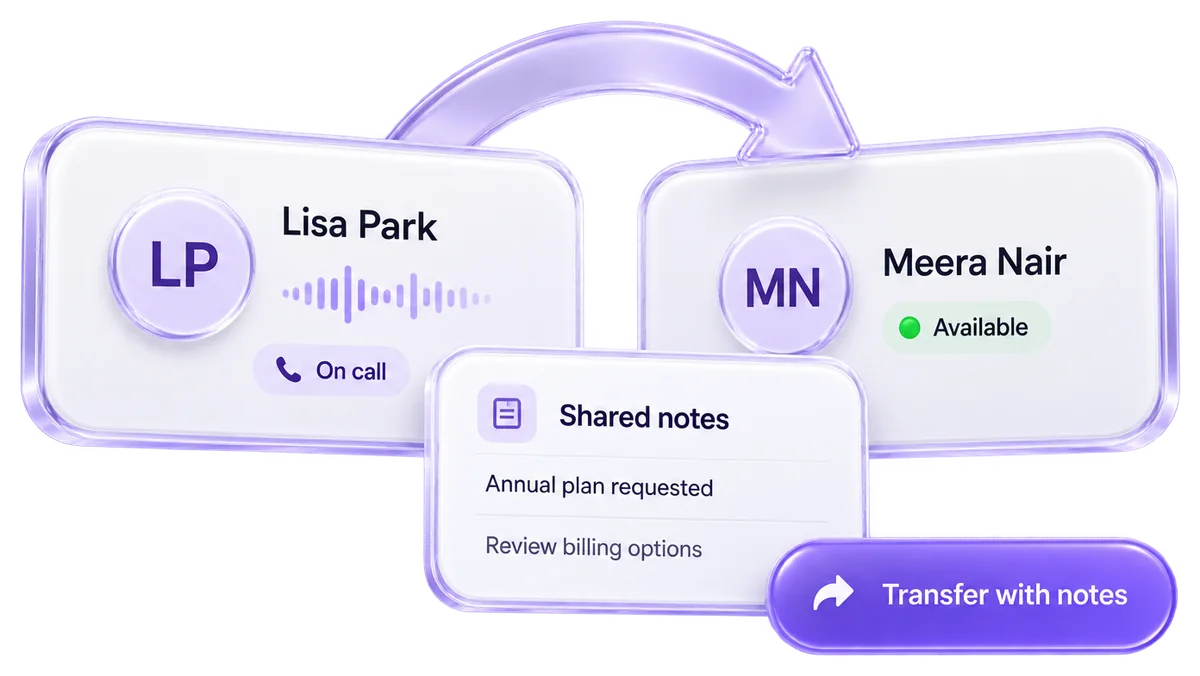
  • Warm transferHand over the call with your notes attached.
  • Cold transferPass the call straight to another agent.
  • ConferenceAdd internal and external people to the call.
  • IVR keypadEnter extensions and navigate phone menus.
  • RecordingRecord calls and keep the link on the record.
  • Live statusRinging, connected, on hold, transferred, ended.
A warm transfer handing a live call and its notes to a second agent
Deal

Every call ends up in the CRM

DialTri checks every number against Leads, Contacts and Accounts before anyone says hello.

Incoming call(415) 555-0142
Match numberFound: Sarah KimNo match
Contact · Sarah KimRecord opens with the timeline
  • 12 SepDemo call · 6 min
  • 03 SepAsked for annual pricing
  • NoteWants 25 seats
Lead · created nowNew lead saved automatically
  • Phone(646) 555-0113
  • SourceInbound call
  • NameUpdates when the caller says it
  • AI summarySaved to the record when the call ends.
  • Logged automaticallyStatus, duration and time, with no duplicates.
  • Missed calls flaggedLogged as missed and marked for follow-up.
Compare

Which dialer fits your team?

Answer two questions. We'll highlight where to start.

Calls per agent
What matters most

DialerWho starts the callLines per agentPaceAgent prepBest forCompliance riskStatus
Click-to-call Agent clicks1Full: the record is openCallbacks and ad-hoc calls LowAvailable now
Preview dialer Agent clicks Start Call1Full: history, notes, talking pointsHigh-value, consultative calls LowAvailable now
Progressive dialer System, when the agent is ready1Short: record pops as it dialsSpeed without dropped calls LowComing soon
Power dialer System, right after each call1MinimalSteady inside-sales lists LowComing soon
Auto dialer System, when the agent is free1Record shows before connectCampaigns at medium to high volume LowAvailable now
Predictive dialer System, ahead of the agent2–3+None: record pops on answerLarge centers with big lists HighComing soon
Parallel dialer System, several lines at once3–5NoneSDR teams on big direct-dial lists MediumComing soon
Voice broadcasting System, to the whole listManyNoneReminders and opt-in alerts HighComing soon

Dial responsibly

Faster dialing raises the stakes on consent and timing. These controls apply in every mode.

  • Calling windowsEach campaign has a start time and an optional end time. Dialing never starts early.
  • Retry limitsSet the retry interval and the maximum attempts per number.
  • One owner per listAssign each Target List to one agent, so no one is called twice.
  • Recording consentTell callers when a call is recorded, as your local rules require.

Consent and do-not-call rules (TCPA, DNC, GDPR and others) differ by country and call type. This is general guidance, not legal advice.

FAQ

Dialer questions, answered

What is the difference between a power and a predictive dialer?
A power dialer calls one number per agent, right after the last call ends. A predictive dialer calls several numbers per agent and guesses when the next agent will be free. Predictive is faster but can drop answered calls when no agent is ready.
Which dialer is safest for compliance?
Click-to-call and the preview dialer, because an agent starts every call. Predictive dialing and voice broadcasting carry the most rules, such as abandoned-call limits and prior consent.
Can different campaigns use different dialers?
Yes. You choose the mode per campaign. Retries, schedules and CRM logging work the same way in every mode.
Do I need new phones or hardware?
No. DialTri runs on your Twilio account inside the CRM. Agents call from the browser with a headset.
Which dialers can I use today?
Click-to-call, the preview dialer and the auto dialer are available now. Progressive, power, predictive, parallel dialing and voice broadcasting are marked coming soon.
Where do the call notes go?
To the CRM record. In-call notes, AI summaries, duration and status save automatically, so nothing is typed in later.

Dial. Ring. Deal.

Start with the dialer that fits your next campaign. Your Twilio number and your CRM are all it needs.

Click-to-callPreviewAuto+5 coming soon